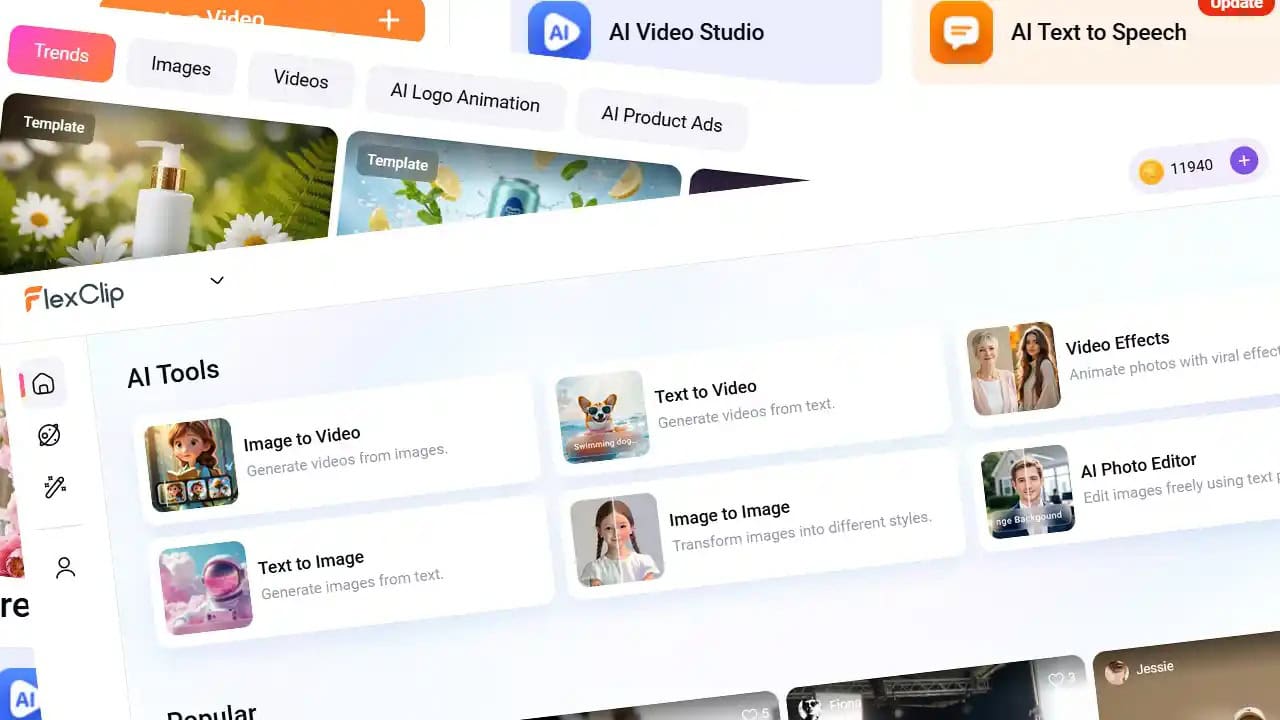
Last updated on May 25th, 2026 at 08:02 am
Creating professional-looking videos used to require expensive software, powerful computers, and hours of learning complicated editing tools. Today, that is rapidly changing thanks to the rise of AI-powered video platforms.
From content creators and marketers to small business owners and educators, more people are searching for the best AI video editor that can help them create videos quickly without sacrificing quality. The challenge, however, is that many AI video tools either feel too limited, too expensive, or too difficult for beginners to use effectively.
That is where FlexClip, an online AI video editor designed to simplify the video creation process through drag-and-drop editing, ready-made templates, AI automation tools, stock media libraries, and browser-based accessibility, enters the conversation. Whether you want to create social media videos, promotional content, slideshows, tutorials, or short-form marketing clips, FlexClip promises to make the process faster and easier.
But does it actually live up to the hype? And more importantly, can it truly compete as one of the best AI video editors available today?
In this review, we will take a closer look at FlexClip’s features, AI tools, pricing, usability, pros and cons, and overall performance to help you decide whether it is the right video editing platform for your needs.
What Is FlexClip?
FlexClip is a browser-based AI video editor designed for users who want to create videos quickly without needing advanced editing skills. Unlike traditional editing software that often requires downloads, heavy processing power, and a steep learning curve, FlexClip runs entirely online, making it accessible from almost any device with an internet connection.
The platform is built around simplicity and speed. Users can create videos using drag-and-drop tools, pre-designed templates, stock footage, music libraries, animations, and AI-powered automation features. Whether you are producing content for YouTube, TikTok, Instagram, business marketing, presentations, or educational purposes, FlexClip aims to streamline the entire production process.
One of FlexClip’s biggest selling points is that it targets everyday users instead of professional filmmakers. The interface is intentionally beginner-friendly, which makes it appealing to small business owners, marketers, educators, freelancers, and content creators who need polished videos without spending weeks learning complex editing software.
So, Is FlexClip One of the Best AI Video Editors for Beginners ?
At this point, it is easy to see why FlexClip is often mentioned in conversations about being the best AI video editor tools available today. On paper, it checks a lot of boxes: it is said to be fast, browser-based, packed with templates, and powered by a growing set of AI features designed to simplify video creation.
But features alone do not tell the full story.
In this section, I am going beyond the marketing claims and taking a hands-on look at how FlexClip actually performs in real use. I will walk through the key features of FlexClip and how I tested each feature, focusing on how well they work for everyday tasks like creating social media videos, marketing content, and simple explainers.
The goal is not just to list what the tool can do, but to evaluate how useful, intuitive, and reliable each feature really is when you are building videos from scratch. This will help answer the real question: is FlexClip truly one of the best AI video editors for beginners, or just another tool with impressive surface-level features? Let’s start by testing the main features of FlexClip.
Key Features of FlexClip
(1) Stock Media and Music Library
To kickstart the review, I first explored FlexClip’s built-in stock media and music library. The platform provides access to a large collection of stock videos, photos, icons, sound effects, and music tracks, which helps reduce the need to source assets from multiple external websites during the editing process.
The platform offers access to millions of royalty-free stock assets, including videos and images integrated from providers such as Pexels, Pixabay, and Unsplash, alongside its own native library. There is also a sizeable music and audio collection available for background tracks and simple video productions.
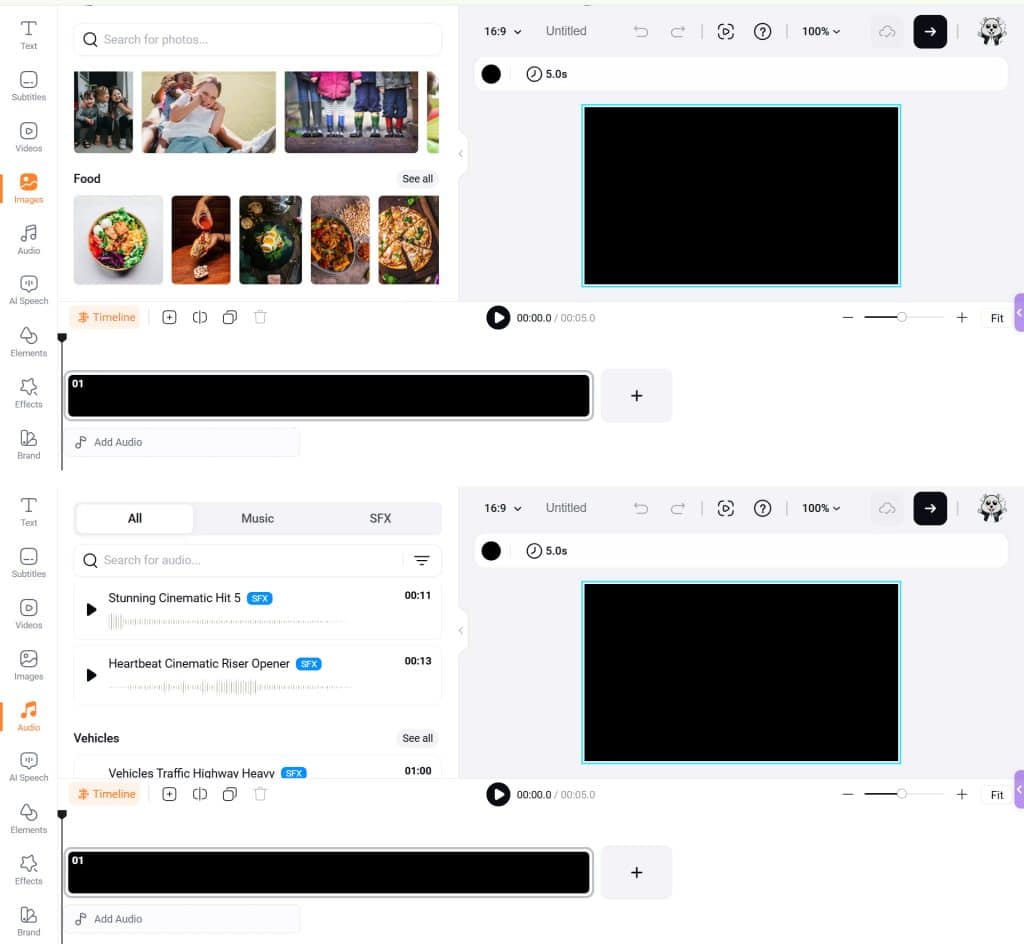
From a practical standpoint, this significantly speeds up the content creation workflow, especially for beginners or small businesses that may not already subscribe to premium stock asset platforms. During my testing, I found the stock search function relatively fast and easy to use, and most common themes or visual styles could be found without much difficulty.
That said, while some assets may feel more geared towards general-purpose content creation, the overall library is still impressively comprehensive for an online AI video editor. For quick social media videos, presentations, marketing clips, educational content, or beginner projects, the built-in stock library is more than sufficient and adds a great deal of convenience to the editing workflow. Having so many assets readily available within the platform also makes the entire creative process feel much faster and smoother, especially for users who want to produce content efficiently without jumping between multiple tools and websites.
(2) Ready-Made Video Templates
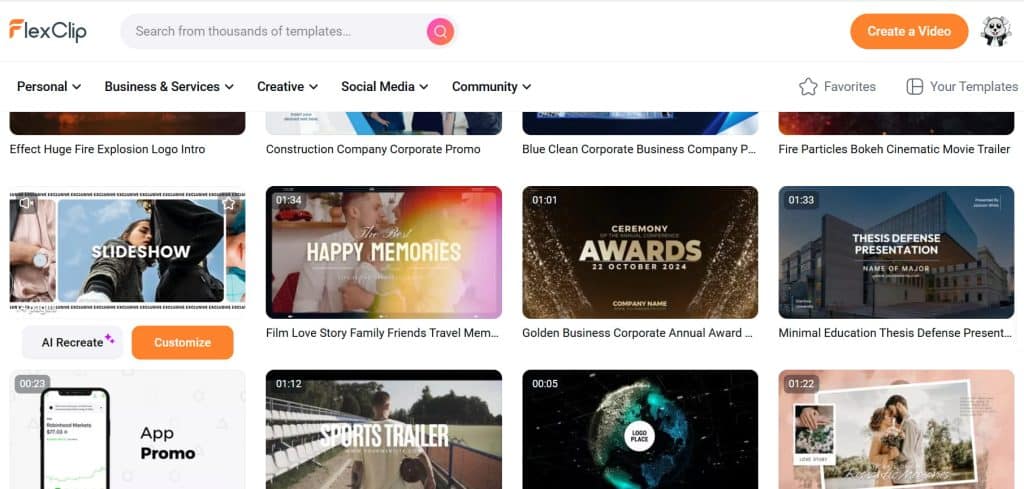
One of FlexClip’s biggest strengths is its massive template library, with 6,000+ professionally designed templates that cover almost every use case, from social media ads to business promos and presentations.
The platform includes thousands of ready-made templates for:
- Social media videos
- Business advertisements
- YouTube intros
- Slideshow presentations
- Promotional campaigns
- Educational videos
These templates make it easier for users to produce professional-looking content even if they have limited design skills. For this test video, I chose a simple template called “Slideshow” and tested its ‘AI Recreate’ feature. There also appears to be a free trial for this function, as I was not charged any AI credits during my test.
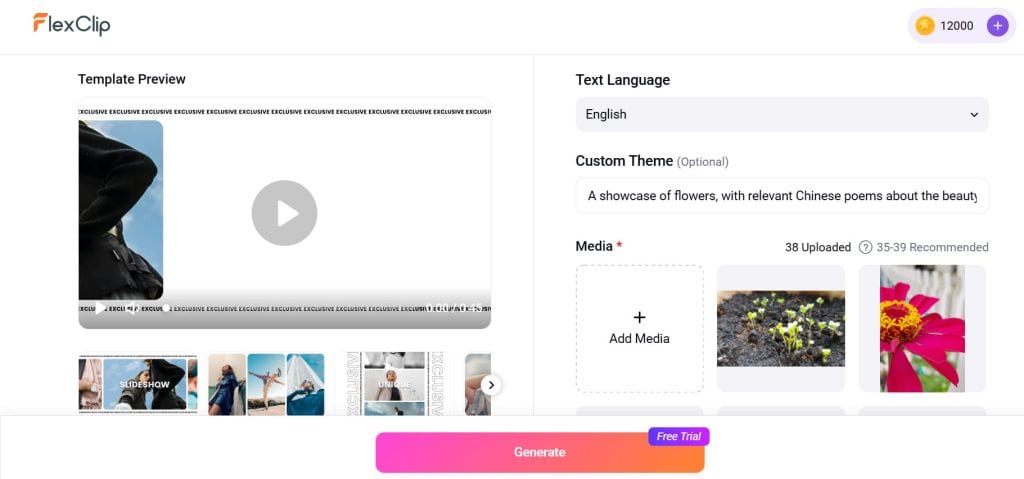
I uploaded 38 flower photos and used a short prompt: “A showcase of flowers, with relevant Chinese poems about the beauty of flowers.” The AI generation process was surprisingly fast, taking under 10 minutes.
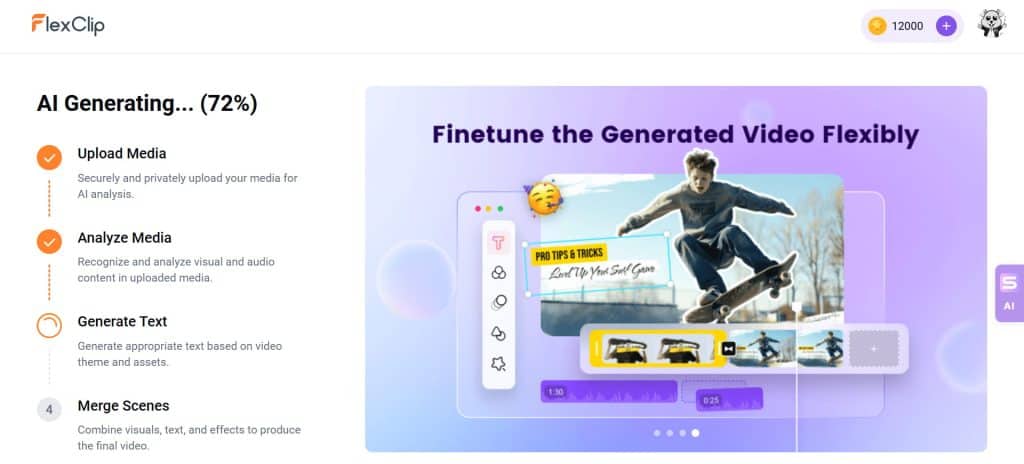
The output was not exactly what I initially expected. Instead of generating original Chinese poems, the tool included Chinese poems that had been translated into English. While this was slightly different from my prompt, it still worked well within the context of the video and did not disrupt the overall visual flow. To be fair, this could also have been partly due to my initial AI prompt not being specific or clear enough.
In fact, for general content creation, the result still feels usable and coherent, especially if your goal is to produce quick social media videos rather than highly specific or text-accurate AI outputs.
From a visual standpoint, the video was reasonably well structured. The flower images were laid out in a clean, aesthetic sequence, and the end result is usable for basic social media content. That said, it still feels more template-driven than truly “AI-generated” in a creative sense.
I also tried editing the text manually, including switching the English captions back into Chinese, and the editor does support Chinese characters without issues. The overall dashboard feels very similar to Canva. Because I am already familiar with Canva, it was easy to adjust the text, rearrange a few images, and upload my own logo.
That said, FlexClip’s editor is intentionally designed to be simple and intuitive. Users can drag media files directly into the timeline, trim clips, add transitions, insert text overlays, and customise animations without needing prior editing experience. This simplicity is probably one of the reasons beginners often find the platform less intimidating than traditional editing software.
Check out my first video created using FlexClip’s ready-made template below, which took me less than 20 minutes to make.
Note that while uploading my video to YouTube, I ran into a music copyright issue. After looking into it, I found that FlexClip has a solution for it. You should submit your YouTube Channel ID under ‘My Account → Whitelist’ to help prevent copyright claims on exported videos and automatically clear licensed music usage issues (Note: The ID should start with “UC” and contain only letters and numbers, with no spaces or additional characters). That said, this is not very obvious during the editing or export process, and users may only discover it after encountering copyright issues. It feels like an important step that should be made more visible within the workflow, especially for beginners who expect a more seamless “one-click export to YouTube” experience.
Overall, based on my experience using a number of other video editing tools, I am actually quite impressed with how complete FlexClip’s dashboard feels. They have managed to pack in many features you would normally expect from a more robust video editor, while still keeping the interface relatively simple and approachable. It is especially well suited for beginners and complete newcomers to video editing, as it lowers the learning curve without stripping away too much functionality.
(3) AI Text-to-Video Generator
FlexClip comes with a wide range of AI-powered tools, but for this review, I decided to focus on testing a few of the more important and practical ones. The first is the AI Text-to-Video Generator, a feature that is especially useful for marketers, bloggers, and businesses looking to quickly repurpose written content into video format. By simply pasting in a script, blog post, or short description, FlexClip can automatically generate visuals, layouts, transitions, and timing suggestions based on the text provided.
FlexClip gives users access to multiple AI video generation models within the same platform. These include models such as Bytedance Seedance 1.5 Pro, Kling 3.0 Pro, OpenAI Sora 2, and Google Veo 3.1, among others. Each model consumes a different amount of AI credits, which means users need to manage their credits carefully or purchase additional credits if needed.
The available models and credit costs at the time of testing included:
- Ultra (50 AI credits)
- Bytedance Seedance 1.5 Pro (30 AI credits)
- Kling 3.0 Pro (120 AI credits)
- OpenAI Sora 2 (60 AI credits)
- Google Veo 3.1 (90 AI credits)
- Minimax Hailuo 2.3 (60 AI credits)
- Bytedance Seedance 2.0 (90 AI credits)
- Kling 2.6 (100 AI credits)
- Kling 2.5 Turbo (75 AI credits)
- Kling 2.1 Master (150 AI credits)
- Kling 1.6 Standard (60 AI credits)
- Minimax Hailuo 02 (60 AI credits)
- Minimax Hailuo 01-director (90 AI credits)
Users can also choose whether to generate their videos in 720p, 1080p, or audio-only format, depending on their needs and available credits.
Before testing the feature, I contacted FlexClip’s customer support through the live chat function to ask which AI model worked best for animation-style videos. I was pleasantly surprised by how responsive the support team was. I received a reply in under half an hour, and they recommended using either Google Veo or Seedance for animated outputs.
Based on that recommendation, I chose Bytedance Seedance 1.5 Pro for my test. I used another AI tool to help generate an AI prompt for a story that I have in mind, then pasted it into FlexClip and selected a 16:9 format with audio and a 12-second duration. The generation process consumed 120 AI credits in total, and took less than 10 minutes.
The initial output looked fairly decent, especially considering how quickly it was generated. The visuals were coherent enough for short-form content, although creating a fully developed narrative would still require stitching together multiple generated clips. That said, this is currently a limitation shared by most AI video generation models on the market, which typically produce clips that are only a few seconds long at a time. Fortunately, FlexClip makes it relatively easy to combine multiple generated clips directly within the dashboard into a single video. More importantly, what stood out most to me was how straightforward and beginner-friendly the entire workflow felt.
Overall, while the AI text-to-video feature may not completely replace professional video production workflows yet, it does a good job of helping beginners and content creators generate fast, usable video content with minimal technical effort.
(4) AI Auto Subtitle Generator
Captions have become essential for social media engagement, and FlexClip’s auto subtitle generator helps automate the process. Instead of manually adding captions line by line, the AI can generate subtitles automatically, helping creators save time while improving accessibility and viewer retention. You can find out more about this feature here.
(5) AI Text-to-Speech
For creators who do not want to record their own narration, FlexClip offers an AI text-to-speech tool that can convert written scripts into spoken audio. This is especially useful for explainer videos, tutorials, product demos, and business presentations where speed and efficiency matter more than manual voice recording.
The voices are surprisingly usable for a built-in tool, and while they may not fully replace a professional human narrator, they still sound clear, structured, and polished enough for most everyday content needs. For quick video production, internal communications, or social media content, the output is more than sufficient and helps streamline the entire editing process.
(6) Long-to-Shorts
One new feature that stood out to me was FlexClip’s Long-to-Shorts tool, which is clearly designed for the growing demand for short-form content on platforms like TikTok, Instagram Reels, and YouTube Shorts. The feature allows users to upload a longer video, such as an interview, podcast, webinar, sermon, or presentation, and automatically generate shorter highlight clips from it.
What makes this tool particularly useful is the amount of time it can potentially save for content creators and marketers. Instead of manually scrubbing through long footage to identify key moments, FlexClip’s AI helps detect sections that are more likely to work as short-form clips. It can also automatically reformat videos into vertical layouts and generate captions, which are essential for social media engagement today.
During testing, the results were not perfect every time, but they were surprisingly usable as a starting point. Some clips still required minor manual trimming or adjustments for pacing and context, but the AI did a decent job identifying meaningful segments from the longer video. For beginners or teams trying to scale content production quickly, this feature can significantly reduce editing time and make short-form repurposing much more accessible.
(7) Cloud-Based Accessibility
Since FlexClip operates entirely online, users can access their projects from different devices without needing to download heavy editing software or worry about hardware limitations. This browser-based setup makes the platform especially convenient for beginners, remote teams, and creators who want the flexibility to edit videos from anywhere.
One feature I found particularly useful is the Cloud Space function, which can be accessed from the left-hand side of the dashboard and is available for premium users. It allows users to upload and store videos, music, images, and other project assets directly online. Besides serving as a convenient backup solution in case of accidental data loss, these uploaded files can also be reused across multiple video projects without needing to upload them repeatedly.
FlexClip also includes a dedicated area for users to upload and manage their Brand Kit, including logos, brand fonts, colours, and a dedicated QR code. This is especially useful for businesses, marketers, and content creators who want to maintain consistent branding across different videos without manually importing the same assets every time.
In practice, these features help streamline the editing workflow more than expected, particularly for users handling multiple projects or recurring brand content. Combined with the platform’s browser-based accessibility, FlexClip feels surprisingly practical and well thought out for day-to-day content creation.
(8) Other Functions
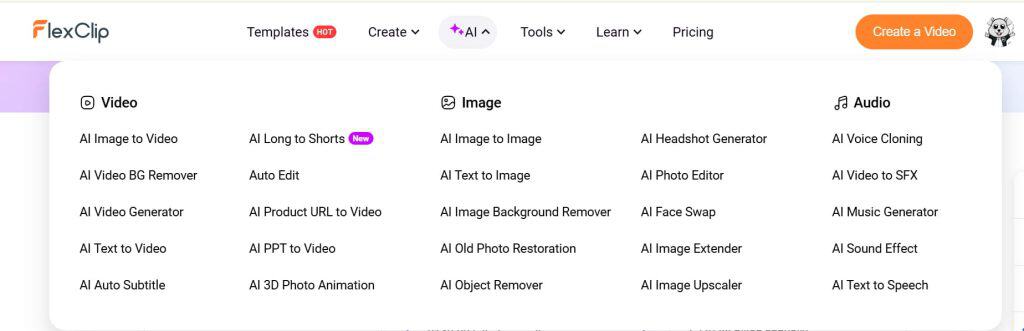
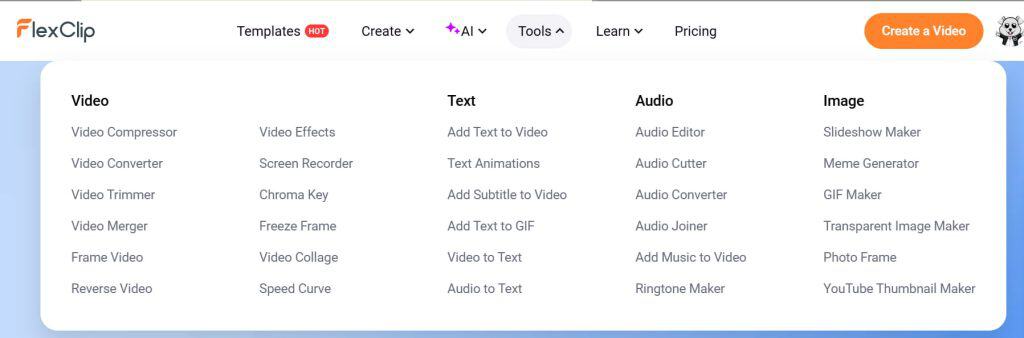
The platform also includes other capabilities such as Image to Video, AI Video Effects, Script to Video, Blog URL to Video, Product URL to Video, PPT/PDF to Video, AI Video Recap, AI Video Auto Edit, Text-Based Editing, AI Image to Image, and even Record Screen. Take a look at the showcase below.
Pricing of FlexClip
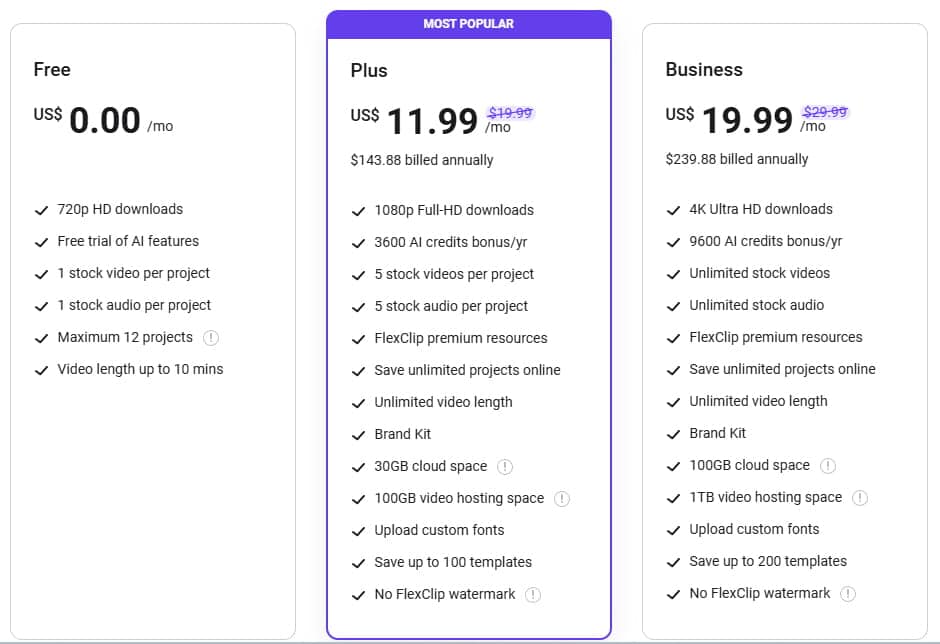
FlexClip currently offers three pricing tiers: Free, Plus and Business.
The free plan is actually fairly usable for beginners who simply want to test the platform before committing to a paid subscription. It allows users to create up to 12 projects, export videos in 720p HD, access free trials of selected AI features, use stock videos and music, and create videos of up to 10 minutes in length.
For users who need more advanced capabilities, the Plus and Business plans unlock higher-quality exports, more AI credits, larger cloud storage, premium stock assets, and additional branding and collaboration features. Considering the sheer number of built-in tools and AI functions available within the platform, I personally find the paid plans reasonably priced compared to many other online video editing tools on the market.
Interestingly, if you are someone who prefers lifetime software deals over recurring subscriptions, FlexClip is also currently available on AppSumo as a lifetime deal at the time of writing. That could make it an even more attractive option for creators and small and medium businesses looking for a more cost-effective long-term investment.
Is FlexClip the Best AI Video Editor for Beginners?
After testing FlexClip across its core features, it is clear that the platform is designed with one main goal in mind: making video creation fast, simple, and accessible to non-professionals. From AI text-to-video and long-to-shorts generation to its stock library, templates, and cloud-based workflow, FlexClip brings together a surprisingly complete set of tools in a single browser-based editor.
It is not a replacement for high-end professional editing software, and it does have limitations when it comes to precision, advanced editing control, and fully accurate AI-generated outputs, although to be fair, that is still a common issue across most AI tools today. However, that is also not really the audience FlexClip is trying to target.
Where FlexClip performs strongly is in speed and usability. It removes much of the technical friction that normally comes with video editing and allows users to produce decent-looking content in a very short amount of time. Features like templates, AI assistance, and built-in assets make it especially practical for social media creators, marketers, small and medium businesses, educators, and beginners who just want to get videos done without a steep learning curve.
Overall, while it may not be the most advanced tool on the market, FlexClip makes a strong case as one of the best AI video editors for beginners and everyday content creation.
Again, here are more details regarding the lifetime deals and their pricing here. Alternatively, you can consider monthly subscription options.
If you buy through my link today, I’ll throw in a high-resolution digital copy of my best-selling infographic ‘128 Art Styles for AI Image Generation’, currently priced at USD10.90*. Don’t wait, dive deeper into one of the best AI video editors now!
(For those using ad blockers, please disable them and clear your browser’s cache before making the purchase so I can track it and send you your free gift.)
* After you’ve purchased FlexClip through my link, simply send me an email at bei@beithoven.com with your name, email address and date of purchase and I’ll send you the infographic.
Disclaimer: This article contains affiliate links. I may earn a small commission, at no extra cost to you, if you click through my links and make a purchase.
Get Started Here!
If you’re interested to create a social media video series for your business, please reach out to me at bei@beithoven.com or +65-9622-8824.